《Javascript 高等程序设计》第21章 Ajax 与 Comet

IE6及更早期版本的写法不做考虑,上一个时代的东西就随时代而去吧:P


Ajax:Asynchronous JavaScript And XML ,其核心是XMLHttpRequest对象(XHR)
注:Ajax通信与数据格式无关,不一定是XML数据

1、XMLHttpRequest 1级

1.1、XHR用法:

  • 创建XHR:var xhr = new XMLHttpRequest();
  • 启动一个请求:xhr.open(“get”, “index.php”, false);
    • 参数为:发送请求类型、请求的URL、是否异步发送请求
    • 不会发送请求,而是准备发送
  • 发送请求:xhr.send();
    • 参数为:请求主体的数据,没有需传入null
  • 响应数据:响应数据会返回给xhr对象,属性为:
    • responseText:响应主体文本
    • responseXML:若响应内容类型是“text/xml”或“application/xml”,则包含响应数据的XML DOM 文档
    • status:响应的HTTP状态
    • statusText:HTTP状态说明
  • 同步请求:检查响应状态并做相应处理
1
2
3
4
5
6
7
8
9
10
11
//Sync method
var xhr = new XMLHttpRequest();

xhr.open("get", "index.txt", false);
xhr.send(null);

if ((xhr.status >= 200 && xhr.status < 300) || xhr.status == 304) {
alert(xhr.responseText);
} else {
alert("Request was unsuccessful: " + xhr.status);
}
  • 异步请求:监听并处理
    • readyState属性:表示请求/响应过程阶段
      • 0:未初始化
      • 1:启动
      • 2:发送
      • 3:接受
      • 4:完成
    • 根据readyState做处理:跨浏览器兼容性XHR请求——响应
    • xhr.abort():在接受以前,可以终止异步请求
1
2
3
4
5
6
7
8
9
10
11
12
13
14
15
16
17
//Async method
var xhr = new XMLHttpRequest();

xhr.onreadystatechange = function(){

if (xhr.readyState == 4) {
if ((xhr.status >= 200 && xhr.status < 300) || xhr.status == 304) {
alert(xhr.responseText);
} else {
alert("Request was unsuccessful: " + xhr.status);
}
}

};

xhr.open("get", "index.txt", true);
xhr.send(null);

1.2、HTTP头部信息:

  • XHR对象提供了操作请求\响应头部信息的方法
    • 设定自定义请求头部信息:setRequestHeader(“myHead”,”myValue”);
      • 调用位置:open之后,send之前
      • 一般不允许重写默认头部
    • 获得响应头部信息:
1
2
var myValue = getResponseHeader(“myHead”); 
var allValue = getAllResponseHeaders(); //通常返回格式化的多行文本信息

1.3、GET请求 (查询数据请求)

  • 传入open()方法的URL末尾的查询字符串必须经过编码
    • 例子:xhr.open(“get”, ”index.php?a=1&b=2&c=3”, false);
  • 辅助函数(向现有URL末尾添加查询字符串):
1
2
3
4
5
6
7
8
//GET function addURLParam
function addURLParam(url, name, value){

url += (url.indexOf("?") == -1 ? "?" : "&");
url += encodeURIComponent(name) + "=" + encodeURIComponent(value);
return url;

}

1.4、POST请求 (保存数据请求)

  • xhr.open(“post”, “index.php”, false);
  • xhr.send();
    • 可以传入XML DOM文档,文档经过序列化后作为请求主体被提交到服务器
    • 可以传入字符串
  • 默认情况下,服务器对POST请求与Web表单的请求不会同等对待,服务端需要有程序读取原始数据来处理,不过可以用XHR模仿表单提交。POST数据格式与查询字符串相同,所以需要将数据变成查询字符串

    • 这个函数会将user-info表单中的数据序列化之后提交给服务器
1
2
3
4
5
6
7
8
9
10
11
12
13
14
15
16
17
18
19
20
21
22
//POST function submitData
function submitData(){

var xhr = new XMLHttpRequest();

xhr.onreadystatechange = function(){

if (xhr.readyState == 4) {
if ((xhr.status >= 200 && xhr.status < 300) || xhr.status == 304) {
alert(xhr.responseText);
} else {
alert("Request was unsuccessful: " + xhr.status);
}
}
};

xhr.open("post", "index.php", true);
xhr.setRequestHeader("Content-Type", "application/x-www-form-urlencoded");
var form = document.getElementById("user-info");
xhr.send(serialize(form));

}

GET 对比与 POST,速度快2倍,消耗资源少,但是只用于查询或传送少量数据


2、XMLHttpRequest 2级 (草案)

2.1、FormData类型:用于序列化表单或创建与表单格式相同的POST数据

  • 创建:var data = new FormData();
  • 传参:data.append(“name”, “Mike”);//传入键值
    • 也可以直接传入表单数据的键对值:data.append(document.forms[0]);
  • 发送:xhr.send(data);
  • *支持较差:IE只支持IE10,对其他浏览器也支持较差

2.2、超时设定:

1
2
3
4
5
6
7
8
9
10
11
12
13
14
15
16
17
18
19
20
21
22
23
24
25
26
//timeout
var xhr = new XMLHttpRequest();
xhr.onreadystatechange = function(){

if (xhr.readyState == 4) {
try{
if ((xhr.status >= 200 && xhr.status < 300) || xhr.status == 304) {
alert(xhr.responseText);
} else {
alert("Request was unsuccessful: " + xhr.status);
}
} catch (ex){
//由 ontimeout 事件处理程序处理
}
}

};

xhr.open("get", "timeout.php", true);
xhr.timeout = 1000;
xhr.ontimeout = function(){

alert("Request did not return in a second");

}
xhr.send(null);

支持较差,IE8+

2.3*、overrideMimeType()


3、进度事件

  • loadstart:在接受响应数据的第一个字节时触发
  • progress:在接受响应期间不断触发
  • error:在请求发生错误时触发
  • abort:在调用abort()终止请求时触发
  • load:收到完整响应数据时触发
  • loadend:通信完成或error、abort、load后触发

支持浏览器:F 3.5+、S 4+、Chrome、IOS的Safari、Android的Webkit、Opera、IE8支持load
没有浏览器支持loadend

3.1、load事件

  • Firefox、Opera、Chrome、Safari 支持load事件
  • 与readstatechange用法一致。

3.2、progress事件

  • 可以做进度条:P
  • onprogress 事件处理程序会收到一个event对象,其target属性是XHR对象,同时包含三个额外属性
    • lengthComputable:表示进度信息是否可用的布尔值
    • position:表示已经接受的字节数
    • totalSize:表示响应头部Content-Length预期的字节数
    • 代码:
1
2
3
4
5
6
7
8
9
10
//progress
xhr.onprogress = function(event){

var divStatus = document.getElementById("status");

if (event.lengthComputable) {
divStatus.innerHTML = "Received " + event.position + " of " +
event.totalSize + "bytes";
}
};

事件处理程序都是放在open之前的。


4、跨域资源共享

CORS (跨域资源共享),定义了在必须访问跨域资源时,浏览器与服务器该如何通信。
基本思想就是使用自定义的头部信息让浏览器与服务器进行沟通
一个简单的GET\POST请求,没有自定义头部,附加一个额外的Origin头部(协议、域名与端口),服务器可以根据头部信息来决定是否给予响应。
Origin:http://www.lalala.net
如果服务器认为可以接受,就在Access-Control-Allow-Origin头部中发送相同源信息。

4.1、IE中的CORS

  • XDR(XDomainRequest)
    • cookie不会发送和返回
    • 只能设置请求头部的content-type字段
    • 不能访问响应头部
    • 只支持GET和POST
    • 支持timeout属性和ontimeout事件处理程序
1
2
3
4
5
6
7
8
9
10
11
12
13
14
15
16
17
18
//CORS IN IE
var xdr = new XDomainRequest();

xdr.onload = function(){

alert(xdr.responseText);

};

xdr.onerror = function(){

alert("An error occourred");

};

xdr.open("post", "http://www.cyberpunk.top/about");
xdr.contentType = "application/x-www-form-urlencoded";
xdr.send("name1=value&name2=value2");

4.2、其他浏览器的CORS

  • 与普通的XHR相同,URL为绝对URL
  • 限制
    • 不能自定义头部
    • cookie不会发送和返回
    • getAllResponseHeaders 总是返回空字符串
4.3、Preflighted Requests
4.4、带凭据的请求

4.5、跨浏览器的CORS解决方案

1
2
3
4
5
6
7
8
9
10
11
12
13
14
15
16
17
18
19
20
21
22
23
24
25
26
27
28
29
//Compatible CORS CODE
function createCORSRequest(method, url){

var xhr = new XMLHttpRequest();

if ("withCredentials" in xhr) {
xhr.open(method, url, true);
} else if (tyepof XDomainRequest != "undefined") {
xhr = new XDomainRequest();
xhr.open(method, url);
} else {
xhr = null;
}

return xhr;

}

var request = createCORSRequest("get", "http://cyberpunk.top");

if (request) {
request.onload = function(){

//对request.responseText 进行处理

};

request.send();
}

5、一些好玩的跨域技术

  • 图片ping

    • 常用于跟踪用户点击页面或动态广告曝光次数
1
2
3
4
5
6
7
8
9
10
//Image Ping
var img = new Image();

img.onload = img.onerror = function(){

alert("Done");

}

img.src = "http://wwww.cyberpunk.top";
  • JSONP (JSON with Padding)

    • 回调函数就是响应到来时应该在页面上调用的函数
    • 数据就是回调函数传入的JSON数据
1
2
3
4
5
6
7
8
9
10
//JSONP
function handleResponse(res){

alert("You're ar IP address " + res.ip + ", which is in " + res.city + ", " + res.region_name);

}

var script = document.createElement("script");
script.src = "http://freegeoip.net/json?callback=handleResponse";
document.body.insertBefore(script, docmuent.body.firstChild);
  • Comet (服务器向页面推送数据)

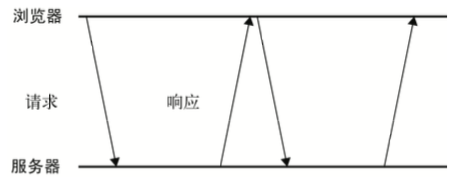
    • 长轮询:页面发送一个到服务器的请求,然后服务器一直保持连接打开

    • 流:在整个页面的生命周期内只使用一个HTTP连接
      长轮询

  • WebSockets
  • SSE